🟢 Basic Level — What Is a Computer?

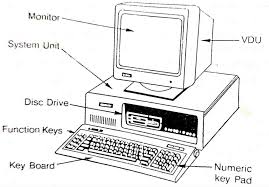
A computer is a general-purpose, programmable electronic machine that processes information according to a set of stored instructions called a program. Unlike a specialised device — a calculator that only does arithmetic, or a clock that only tells time — a computer can run any program you give it. This universality is what makes computers transformative. The same physical hardware that runs your web browser can also run a flight simulator, a hospital management system, or a machine learning model that diagnoses disease from medical images.
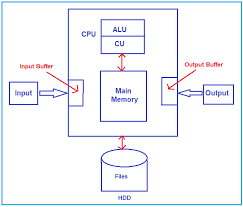
The core of how a computer works can be understood through one elegant model: the IPO Cycle — Input, Processing, Output. Everything you will ever do with a computer, from sending a message to training an AI model, fits inside this model. When you type on a keyboard, that is input. The CPU processes the keystrokes according to the rules of your operating system and application. The characters appear on your screen — that is output. Even streaming a 4K video is just this cycle happening millions of times per second.
⌨️ Input Devices
Data enters the computer through input devices: keyboard, mouse, microphone, camera, touchscreen, scanner, or sensor. Input is raw — it carries no meaning until the CPU processes it according to a program's instructions.
🧠 Processing — CPU
The Central Processing Unit (CPU) executes instructions — billions per second on modern chips. It fetches instructions from memory, decodes what each instruction means, executes the operation, and writes the result back. Everything runs through the CPU.
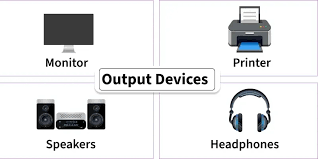
📺 Output Devices
Processed results are sent to output devices: monitor, speakers, printer, or network card. Output is the final, meaningful result of computation — the information the user or another system actually receives and acts on.
💾 Memory & Storage
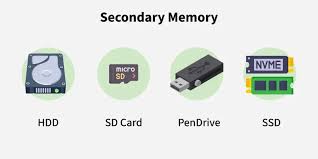
RAM is fast, temporary working memory — it loses content when power is removed. SSDs and HDDs are permanent storage. The CPU reads programs and data from storage into RAM, processes them, and writes results back. More RAM means more simultaneous programs without slowdown.

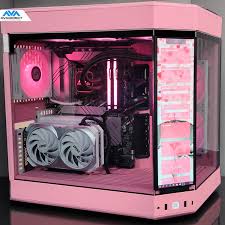
Main Components of a Computer System
A modern computer is a carefully engineered system of interdependent components. Understanding each component — and critically, why it exists — is the first step to understanding computing as a discipline rather than just a set of tools.
- CPU (Central Processing Unit): The brain of the computer. The CPU executes the fetch-decode-execute cycle billions of times per second. Modern CPUs have multiple cores — each an independent processing unit — allowing genuine simultaneous execution of multiple programs. Clock speed (measured in GHz) tells you how many instruction cycles the CPU completes per second. A 3GHz CPU completes three billion instruction cycles every second.
- RAM (Random Access Memory): The computer's working memory. When you open a program, it loads from slow permanent storage into fast RAM so the CPU can access it quickly. RAM is volatile — contents are lost when power is removed. More RAM allows more programs to run simultaneously without the system needing to swap data to disk, which is significantly slower.
- Motherboard: The central circuit board connecting all components. CPU, RAM, storage drives, GPU, and expansion cards all communicate through the motherboard. It contains the system bus — the high-speed data pathway — and the chipset that manages communication between components running at different speeds.
- Storage (SSD / HDD): Permanent, non-volatile storage where the operating system, applications, and user data reside. SSDs use NAND flash memory — no moving parts, very fast read/write speeds (500 MB/s to 7000 MB/s). HDDs use spinning magnetic platters — much slower (100–200 MB/s) but cheaper per gigabyte. Modern systems use SSDs for speed and HDDs for bulk storage.
- GPU (Graphics Processing Unit): Originally designed to render video frames at high speed, the GPU is now essential for AI and machine learning because its thousands of small parallel cores are perfect for the matrix multiplication operations that underpin neural network training. An NVIDIA A100 GPU can perform 312 trillion floating-point operations per second.
- Power Supply Unit (PSU): Converts AC mains power into the DC voltages components require (3.3V, 5V, 12V). PSU quality affects system stability — an undersized or low-quality PSU causes random crashes and component damage. Efficiency ratings (80 Plus Bronze, Gold, Platinum) indicate how much power is wasted as heat.
"A computer does not think. It obeys. The intelligence you perceive in software is entirely the intelligence of the programmer who wrote the instructions — compressed, stored, and executed at a billion operations per second."
— Learn with LSGP, Computer Fundamentals Guide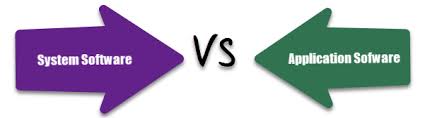
System Software vs Application Software
Hardware is the body of a computer; software is its mind. Without software, hardware cannot do anything useful. Software divides cleanly into two categories every developer must understand deeply:
System software manages hardware and provides a platform for applications to run on. The operating system is the most critical piece of system software — it manages memory allocation, process scheduling, file systems, user authentication, and hardware abstraction. Device drivers are another class: they translate generic OS calls into hardware-specific commands your GPU or printer can execute. Firmware is system software embedded permanently in hardware chips.
Application software performs specific tasks for users. Word processors, browsers, games, IDEs, and accounting software are all applications. They run on top of the OS, which provides them with a stable, hardware-agnostic environment. This separation — where applications do not need to know about specific hardware — is one of the most important abstractions in all of computer science.
🟡 Intermediate Level — How Computers Work Inside
Once you understand the basic components, the next knowledge layer is how all those components are coordinated to run software — and how your computer connects to the world. This is the transition from being a computer user to genuinely understanding the machine you use every day.
The Operating System: Manager of Everything
The operating system is the master program that sits between your hardware and every application you run. Without it, you would need to write machine code directly for the processor for every task — a process that would take years to display a single window on screen. The OS solves this by providing four categories of resource management:
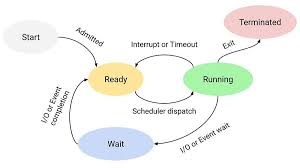
- Process Management: Every running program is a process. The OS scheduler decides which process gets CPU time, for how long, and in what priority order. On a machine running hundreds of processes, the scheduler creates the illusion of parallelism by switching between processes so rapidly — in intervals of milliseconds — that every process appears to run simultaneously. This is called context switching, and it is one of the OS's most important functions.
- Memory Management: The OS controls which processes can access which regions of RAM, preventing processes from reading or corrupting each other's memory. It uses virtual memory to give every process the illusion of more RAM than physically exists — by swapping less-used memory regions to disk (the swap file) and loading them back on demand. This is transparent to applications.
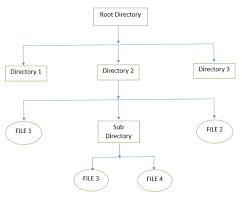
- File System Management: Files must be created, read, written, deleted, and organised reliably — even when the system loses power mid-write. The OS manages file systems (ext4 on Linux, NTFS on Windows, APFS on macOS) that lay out data on physical storage, maintain metadata (file names, sizes, permissions, timestamps), and use journaling to prevent corruption during unexpected shutdowns.
- Provides communication between hardware and software.
- Ensures efficient use of system resources.
- Prevents conflicts when multiple programs access devices.
- Improves system performance and reliability.
- Maintains security and controlled access to hardware.
- Efficient hardware utilization.
- Improved system responsiveness.
- Enhanced security and protection.
- Better device compatibility.
- Reliable data transfer operations.
- Support for modern plug-and-play devices.
I/O Device Management
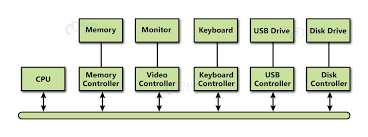
I/O (Input/Output) Device Management is a fundamental function of an Operating System. It manages communication between software applications and hardware devices such as keyboards, mice, printers, scanners, storage devices, cameras, and network adapters.
Why I/O Device Management is Important
Role of Device Drivers
A device driver is specialized software that allows the Operating System to communicate with a specific hardware device. Drivers abstract hardware details, enabling applications to run on different systems without modification.
Types of I/O Devices
Input Devices
Devices that send data to the computer, including keyboards, mice, scanners, microphones, webcams, and touchscreens.
Output Devices
Devices that display or produce information such as monitors, printers, speakers, projectors, and plotters.
Storage Devices
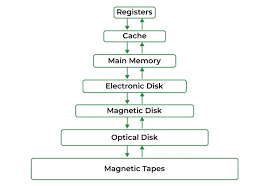
Devices used for long-term data storage, including HDDs, SSDs, USB drives, and memory cards.
Techniques Used in I/O Management
Buffering
Buffering uses temporary memory to store data during transfer operations, helping manage speed differences between devices and the CPU.
Caching
Frequently accessed data is stored in cache memory, allowing faster retrieval and improving overall system performance.
Spooling
Spooling stores tasks such as print jobs in a queue, allowing multiple requests to be processed efficiently by a single device.
Interrupts and DMA
Interrupt-driven I/O allows devices to notify the CPU when an operation is complete, reducing unnecessary waiting and improving CPU utilization.
Direct Memory Access (DMA) enables devices to transfer data directly to memory without continuous CPU involvement, significantly increasing performance.
Benefits of I/O Device Management
Networking: How Computers Communicate
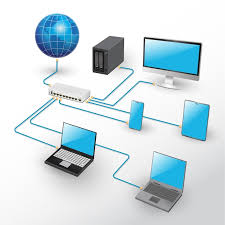
Computer networking enables devices to connect, exchange data, and share resources. It forms the backbone of the Internet, cloud computing, online communication, and modern digital services.
Computer networking is the process of connecting two or more devices to exchange information and share resources. Networks enable communication between computers, servers, smartphones, printers, and IoT devices. Through networking, users can access websites, send emails, transfer files, and use cloud services. Modern businesses, educational institutions, and governments rely heavily on networking for daily operations. The Internet itself is the world's largest computer network. Networking improves collaboration, resource utilization, and communication efficiency, making it one of the most important technologies in today's digital world.
2. Types of Computer Networks
Computer networks are categorized based on their geographical coverage. A Local Area Network (LAN) connects devices within a small area such as a home or office. A Metropolitan Area Network (MAN) covers larger areas such as cities. A Wide Area Network (WAN) connects networks across countries and continents. The Internet is the largest WAN. Personal Area Networks (PANs) connect devices over short distances using technologies like Bluetooth. Each network type serves different purposes while ensuring efficient communication and resource sharing among connected devices.
3. Network Components
A computer network consists of hardware and software components. Hardware includes routers, switches, modems, access points, servers, cables, and network interface cards. Software components include network operating systems, communication protocols, and security applications. Routers connect different networks, switches manage communication within a network, and servers provide services and resources to clients. These components work together to ensure reliable data transmission, efficient communication, and secure access to network resources. Without these elements, modern networking would not be possible.
4. IP Addressing
An Internet Protocol (IP) address is a unique identifier assigned to devices connected to a network. It allows data packets to reach the correct destination. IPv4 uses a 32-bit addressing scheme, while IPv6 uses 128 bits to support a much larger number of devices. IP addresses can be public or private depending on their purpose. They play a crucial role in routing and communication across networks. Every device connected to the Internet requires an IP address for successful communication and data exchange.
5. MAC Addressing
A Media Access Control (MAC) address is a permanent hardware identifier assigned to a network interface card by the manufacturer. Unlike IP addresses, MAC addresses usually remain unchanged throughout the device's lifetime. Switches use MAC addresses to identify devices and forward data accurately within local networks. MAC addresses operate at the Data Link Layer and help ensure reliable communication between devices connected to the same network segment.
6. Network Protocols
Protocols are standardized rules that govern communication between devices. Examples include HTTP for websites, HTTPS for secure communication, FTP for file transfers, SMTP for email, and DNS for domain name resolution. Protocols define how data is formatted, transmitted, received, and processed. They ensure compatibility between different devices and operating systems. Without communication protocols, networked devices would be unable to understand each other and exchange information effectively.
7. The OSI Model
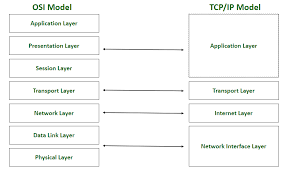
The OSI model is a seven-layer framework used to understand networking processes. The layers are Physical, Data Link, Network, Transport, Session, Presentation, and Application. Each layer performs specific tasks related to communication. The model helps network engineers troubleshoot problems, design systems, and understand data flow. Although modern networks primarily use TCP/IP, the OSI model remains an important educational tool for learning networking concepts and architectures.
8. TCP/IP Model
The TCP/IP model is the practical networking framework used on the Internet. It consists of four layers: Network Access, Internet, Transport, and Application. It provides the foundation for global communication by defining how data is transmitted, routed, and received. Protocols such as TCP, UDP, IP, HTTP, and DNS operate within this model. TCP/IP ensures interoperability between devices and networks worldwide, making modern Internet communication possible.
9. TCP and UDP
TCP provides reliable communication by establishing connections, detecting errors, and retransmitting lost data. It is commonly used for web browsing, email, and file transfers. UDP prioritizes speed over reliability and does not guarantee delivery. It is used in online gaming, video conferencing, live streaming, and VoIP applications. Choosing between TCP and UDP depends on whether reliability or low latency is more important for the application.
10. DNS (Domain Name System)
DNS translates human-readable domain names into IP addresses. Instead of remembering numerical IP addresses, users can access websites using easy-to-remember names. DNS servers store and manage these mappings, allowing quick resolution of website requests. DNS plays a critical role in web browsing, cloud computing, email services, and almost every Internet activity. Without DNS, navigating the Internet would be significantly more difficult and less user-friendly.
11. Routing and Routers
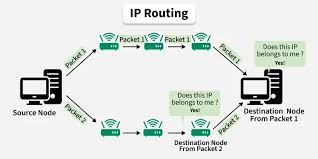
Routing determines the path data packets take from source to destination. Routers examine destination IP addresses and forward packets through the most efficient routes. They maintain routing tables and use routing protocols to update network information dynamically. Routers connect different networks together and enable communication across the Internet. Efficient routing improves performance, reduces delays, and ensures reliable delivery of information between devices.
12. Switching and Switches
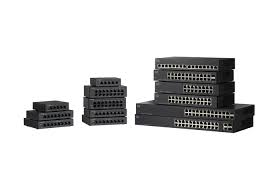
Switches connect devices within a local area network and use MAC addresses to forward data only to the intended recipient. This reduces network congestion and improves efficiency compared to hubs. Modern switches support advanced features such as VLANs, Quality of Service, and network security controls. They are essential components of enterprise, campus, and home networks where efficient local communication is required.
13. Wireless Networking
Wireless networking allows devices to communicate using radio waves instead of cables. Wi-Fi is the most widely used wireless technology, providing convenient Internet access for laptops, smartphones, and IoT devices. Wireless access points distribute network connectivity throughout homes, offices, and public spaces. Security standards such as WPA2 and WPA3 protect wireless communication from unauthorized access while maintaining flexibility and mobility for users.
14. Network Security
Network security protects systems, devices, and data from cyber threats. Security measures include firewalls, encryption, authentication, intrusion detection systems, and antivirus software. These tools help prevent unauthorized access, malware infections, data breaches, and cyberattacks. Strong security practices are essential for maintaining confidentiality, integrity, and availability of information. As networks continue to grow, cybersecurity remains one of the most critical aspects of networking.
15. How Data Travels Across the Internet
When a user accesses a website, the requested information is broken into small packets. These packets travel through routers, switches, and communication links across multiple networks. Each packet contains addressing information that helps it reach the correct destination. At the receiving end, packets are reassembled into their original form. This process occurs within milliseconds and allows users to browse websites, stream videos, send messages, and access online services efficiently.
When you visit learnwithlsgp.in, the following happens in under 200 milliseconds: your browser queries a DNS resolver for the IP address; a TCP three-way handshake (SYN, SYN-ACK, ACK) establishes a connection; TLS negotiates an encrypted session in 1–2 round trips; your browser sends an HTTP GET request; the server responds with HTML; your browser parses the HTML, discovers CSS and JavaScript files, fetches them in parallel using HTTP/2 multiplexing, and renders the final page. Every one of these steps involves protocols built on the foundational layered model of networking.
🔴 Advanced Level — Engineering at the System Level
The advanced level is where computer science becomes software engineering. You stop using tools others built and start learning to build the tools themselves. This is the knowledge that separates junior developers from senior engineers — and it is what Learn with LSGP's advanced content is designed to give you.
Algorithms and Complexity Analysis
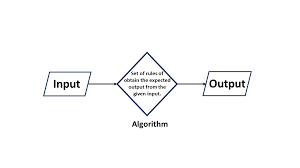
An algorithm is a precise, finite sequence of mathematically rigorous, unambiguous instructions designed to solve a computational problem or execute a specific task by transforming a set of initial inputs into a predictable, structured output. At its most fundamental level, an algorithm serves as the abstract logical blueprint for software engineering, operating independently of any specific programming language, hardware architecture, or runtime environment. The study of algorithms lies at the very heart of computer science, bridging the gap between theoretical mathematics and the practical construction of high-performance, scalable systems. Writing functional code that correctly processes data is merely the baseline of computer engineering; true software mastery requires an in-depth understanding of algorithmic efficiency, structural design paradigms, and hardware interaction. In modern computing, where datasets routinely span billions of records and systems must handle concurrent global requests, an unoptimized algorithm can instantly paralyze an enterprise infrastructure, while a well-designed, mathematically sound algorithm can handle the exact same workload seamlessly using minimal hardware resources.
To be considered valid and functional, an algorithm must strictly satisfy several foundational criteria established by theoretical computer science. The first of these is finiteness, which dictates that the algorithm must inevitably terminate after a specific, limited number of execution steps, preventing infinite loops that permanently consume processing cycles. The second is definiteness, which requires that every single instruction must be completely clear, precise, and entirely free of ambiguity; there must be no room for interpretation or random behavior unless explicitly designed as a stochastic or randomized algorithm. Third, an algorithm must have well-defined inputs, accepting zero or more clearly specified data elements from a strict mathematical domain. Fourth, it must yield at least one output that bears a mathematically verifiable, correct relationship to the initial inputs. Finally, it must exhibit effectiveness, meaning that every operation contained within the sequence must be sufficiently basic, realistic, and feasible to be executed exactly in a finite amount of time, even using basic manual tools like a pen and paper.
Comprehensive List of Algorithms
Sorting Algorithms
- Bubble Sort
- Selection Sort
- Insertion Sort
- Merge Sort
- Quick Sort
- Heap Sort
- Radix Sort
- Counting Sort
- Bucket Sort
- Shell Sort
- TimSort
Search Algorithms
- Linear Search
- Binary Search
- Jump Search
- Interpolation Search
- Exponential Search
- Ternary Search
Graph & Pathfinding Algorithms
- Breadth-First Search (BFS)
- Depth-First Search (DFS)
- Dijkstra’s Algorithm
- A* Search Algorithm
- Bellman-Ford Algorithm
- Floyd-Warshall Algorithm
- Kruskal’s Algorithm
- Prim’s Algorithm
- Borůvka's Algorithm
- Kosaraju's Algorithm
- Tarjan's Strongly Connected Components Algorithm
- PageRank Algorithm
Cryptography & Hashing Algorithms
- AES (Advanced Encryption Standard)
- DES (Data Encryption Standard)
- RSA (Rivest–Shamir–Adleman)
- Diffie-Hellman Key Exchange
- ECC (Elliptic Curve Cryptography)
- MD5 (Message-Digest Algorithm 5)
- SHA-256 / SHA-3 (Secure Hash Algorithms)
- Bcrypt
- HMAC (Hash-based Message Authentication Code)
String & Pattern Matching Algorithms
- Knuth-Morris-Pratt (KMP) Algorithm
- Boyer-Moore String-Search Algorithm
- Rabin-Karp Algorithm
- Aho-Corasick Algorithm
- Manacher's Algorithm
- Levenshtein Distance (Edit Distance Algorithm)
Machine Learning & Data Science Algorithms
- Linear Regression
- Logistic Regression
- Decision Trees
- Random Forest
- Support Vector Machines (SVM)
- K-Nearest Neighbors (KNN)
- K-Means Clustering
- Naive Bayes Classifier
- Gradient Boosting (e.g., XGBoost)
- Backpropagation (Neural Network Training)
Compression Algorithms
- Huffman Coding
- Run-Length Encoding (RLE)
- LZ77 / LZ78 (Lempel-Ziv)
- LZW (Lempel–Ziv–Welch)
- Deflate
Numerical & Mathematical Algorithms
- Euclidean Algorithm (Greatest Common Divisor)
- Sieve of Eratosthenes (Prime Numbers)
- Newton-Raphson Method (Root Finding)
- Fast Fourier Transform (FFT)
- Karatsuba Algorithm (Fast Multiplication)
-Databases: The Backbone of Every Application
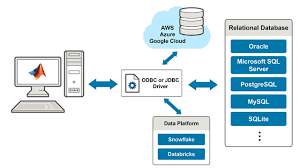
Almost every application you build stores and retrieves persistent data. Understanding databases — both how to use them and how they work internally — is therefore one of the most practically valuable skills in software engineering.
Relational databases (PostgreSQL, MySQL, SQLite) organise data in tables with rows and columns, enforce relationships between tables with foreign keys, and guarantee data integrity through ACID transactions. ACID stands for Atomicity (a transaction fully succeeds or fully fails — no partial updates), Consistency (the database moves only between valid states), Isolation (concurrent transactions do not corrupt each other), and Durability (committed data survives system failures). SQL is the query language for relational databases, and knowing it well is one of the most durable and transferable skills in all of technology.
NoSQL databases trade some of RDBMS rigidity for flexibility and horizontal scalability. MongoDB stores schemaless JSON-like documents. Redis is an in-memory key-value store used for caching, sessions, and real-time leaderboards. Apache Cassandra is a wide-column store built for write-heavy workloads at massive scale — it powers Discord's message storage at hundreds of billions of messages. The choice between relational and non-relational is one of the most consequential architectural decisions a backend engineer makes.
System Design Fundamentals
System design is the discipline of planning how a large software system will be architected to meet both functional requirements (what it does) and non-functional requirements (how well it does it — performance, availability, consistency, scalability, and cost). Senior engineering interviews at top companies dedicate entire rounds to system design.
⚖️ Load Balancing
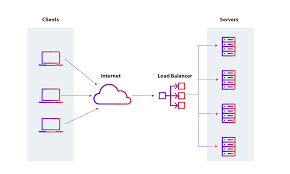
Distributes traffic across multiple servers to prevent bottlenecks. Algorithms include round-robin, least connections, and consistent hashing. Hardware (F5, Citrix) and software (Nginx, HAProxy, AWS ALB) load balancers are both common.
💨 Caching
Stores frequently accessed data in fast memory (Redis, Memcached) to reduce database load and response latency. Cache invalidation — deciding when cached data is stale — is one of the hardest problems in distributed systems design.
📤 Message Queues
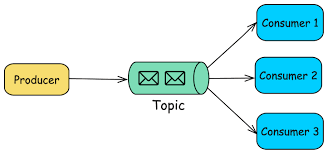
Kafka, RabbitMQ, and AWS SQS decouple producers and consumers of data so traffic spikes do not cascade into failures. Essential for microservices architectures where services must communicate asynchronously without tight coupling.
📐 CAP Theorem
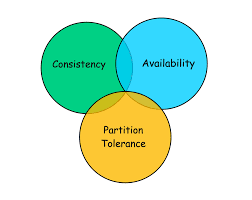
In any distributed system, you can guarantee at most two of: Consistency (all nodes see the same data), Availability (every request gets a response), and Partition Tolerance (system works despite network failures). Every database trade-off flows from this theorem.
🔄 Microservices
Decomposing a large application into small, independently deployable services — each responsible for one business capability. Netflix runs over 700 microservices. Enables independent scaling, deployment, and fault isolation, at the cost of distributed systems complexity.
🔍 Database Indexing
A B-tree or hash index dramatically speeds up data retrieval at the cost of additional storage and write overhead. A well-placed index can reduce a query from seconds to milliseconds. Poor indexing strategy is the most common cause of production database performance problems.