
1. Why Web Technologies Matter
The web is the largest software platform ever created. Over five billion people use it every day for everything from reading news and sending emails to running entire businesses. Behind every website, web app, and API is a stack of carefully chosen technologies — and as a CS/IT student in India, understanding this stack is one of the highest-leverage skills you can build. Learn with LSGP's Web Technologies curriculum is designed around a single conviction: you should understand not just how to use a tool but why it exists and what problem it solves.
The Scale of the Web
Consider a few numbers: Google indexes over 100 billion web pages. Netflix streams to 238 million subscribers simultaneously using web protocols. The Indian government's UMANG app serves 2,000+ government services over HTTP APIs. WhatsApp's web client — a single-page React application — handles over 100 billion messages daily. Every single one of these systems is built on the technologies you will study in this guide.
Web development is also the most accessible form of software development: you need only a browser and a text editor to start. No SDK downloads, no hardware requirements, no compilation step for your first HTML file. This low barrier to entry combined with enormous career demand makes web technologies one of the best investments a CS/IT student can make in their skill set.
Full-Stack vs Specialised Roles
The web industry generally divides engineering roles into frontend (what the user sees and interacts with), backend (servers, databases, business logic), and full-stack (both). Infrastructure and DevOps engineers manage the systems that deploy and run web applications at scale. As a student, Learn with LSGP recommends starting with a solid foundation in all three layers before specialising — this breadth makes you a far more effective engineer and gives you better context for system design discussions in interviews.
Web Technologies in Indian Placements
In campus drives and off-campus recruitment, web development skills show up in two ways: technical interviews that test your knowledge of how things work (HTTP, browsers, REST APIs, JavaScript event loop), and practical assessments where you build a small feature or fix a bug in a codebase. Companies like Razorpay, Atlassian, ShareChat, Meesho, Groww, and Swiggy put significant weight on web fundamentals. Even product-focused companies like Google and Microsoft have frontend, backend, and full-stack SDE roles where web tech is the primary focus.
Learn with LSGP's Web Technologies section is your structured path from "I know what a website is" to "I can build, optimise, secure, and deploy a full-stack web application."
2. How the Web Works
Before writing a single line of HTML, every web developer should understand the journey a request takes from a user's browser to a server and back. This journey involves multiple layers of networking, addressing, and protocol translation that work together seamlessly — usually in under 200 milliseconds for a well-optimised site.
Clients and Servers
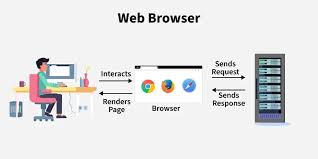
The web is built on the client-server model. A client (typically a browser like Chrome or Firefox) initiates requests for resources. A server (a computer running software like Nginx or Apache) responds with those resources — HTML files, images, JSON data, and so on. The server waits; the client speaks first. This asymmetry is fundamental to how the web is architected.
In practice, a "server" for a modern web application is often many servers — a CDN edge node delivers static assets, an application server runs business logic, a database server stores persistent data, a cache server stores frequently accessed data in memory, and a message queue handles background jobs. Understanding this distributed architecture is the foundation of system design.
DNS — Turning Names into Addresses
Every device on the internet has an IP address — a numerical label like 142.250.182.78. But humans use domain names like learnwithlsgp.in. The Domain Name System (DNS) is the distributed directory that translates domain names to IP addresses. When you type a URL in your browser:
- The browser checks its own DNS cache. If found, done.
- If not, it asks the operating system's DNS resolver.
- The OS resolver asks the configured DNS server (usually your ISP's or Google's 8.8.8.8).
- If that DNS server doesn't know, it recursively queries root name servers → TLD name servers (.in, .com) → authoritative name servers for the specific domain.
- The IP address is returned and cached at each level with a TTL (time-to-live).
This entire process typically takes 1–100ms and happens before a single byte of the actual web page is transferred. Slow DNS resolution is a real performance bottleneck for some users — which is why DNS prefetching and CDN name servers close to users matter.
TCP/IP — Reliable Data Delivery
Once the browser has the server's IP address, it establishes a connection using TCP (Transmission Control Protocol). TCP ensures that data arrives complete and in order, even though the underlying internet may deliver packets out of order or drop some entirely. It does this through acknowledgement, sequencing, and retransmission. The cost is a three-way handshake before any data flows: SYN → SYN-ACK → ACK. This takes one round-trip time (RTT).
For HTTPS, there is an additional TLS handshake after the TCP handshake to establish encryption keys — another 1–2 RTTs. Modern TLS 1.3 and HTTP/2 reduce this overhead significantly. Understanding these handshakes is essential for understanding web performance — every millisecond of latency between client and server multiplies these handshakes.
The Full Request Journey
| Step | What Happens | Typical Time |
|---|---|---|
| 1. DNS Lookup | Resolve domain to IP | 1–100ms |
| 2. TCP Handshake | Establish reliable connection | 1 RTT (~10–100ms) |
| 3. TLS Handshake | Negotiate encryption (HTTPS) | 1–2 RTTs |
| 4. HTTP Request | Browser sends GET/POST request | <1ms |
| 5. Server Processing | App logic, database queries | 10–500ms |
| 6. HTTP Response | Server sends HTML/JSON | Depends on payload size |
| 7. Browser Rendering | Parse HTML, fetch sub-resources, paint | 100ms–2s |
3. HTTP & HTTPS — Deep Dive
HTTP (HyperText Transfer Protocol) is the application-layer protocol that powers the web. Every time your browser loads a page, it sends an HTTP request and receives an HTTP response. Understanding HTTP deeply — not just "it's how browsers talk to servers" — is essential for building reliable, performant web applications and for debugging problems when things go wrong.
HTTP Request Anatomy
An HTTP request has four parts: the request line (method + URL + HTTP version), headers (metadata about the request), an optional body (data sent to the server, used by POST/PUT), and a blank line separating headers from body.
HTTP Methods
| Method | Purpose | Has Body? | Idempotent? |
|---|---|---|---|
| GET | Retrieve a resource | No | Yes |
| POST | Create a new resource | Yes | No |
| PUT | Replace a resource entirely | Yes | Yes |
| PATCH | Update part of a resource | Yes | No (usually) |
| DELETE | Remove a resource | No | Yes |
| HEAD | GET without body (check headers) | No | Yes |
| OPTIONS | List allowed methods (used by CORS) | No | Yes |
Idempotent means calling the method multiple times with the same input produces the same result. Deleting a resource twice is idempotent (second call finds nothing to delete, state is the same: resource is gone). Creating a resource twice is not — you might get two records.
HTTP Status Codes
Status codes are grouped by their first digit:
- 1xx Informational: Request received, processing continues. Rare in everyday development.
- 2xx Success: 200 OK (generic success), 201 Created (resource created), 204 No Content (success, no body — used for DELETE).
- 3xx Redirection: 301 Moved Permanently (SEO-friendly permanent redirect), 302 Found (temporary redirect), 304 Not Modified (cached version is still valid).
- 4xx Client Error: 400 Bad Request (malformed data), 401 Unauthorized (not authenticated), 403 Forbidden (authenticated but no permission), 404 Not Found, 422 Unprocessable Entity (validation failed), 429 Too Many Requests (rate limited).
- 5xx Server Error: 500 Internal Server Error (unhandled exception), 502 Bad Gateway (upstream server failed), 503 Service Unavailable (overloaded or down), 504 Gateway Timeout.
HTTP/1.1 vs HTTP/2 vs HTTP/3
HTTP/1.1 (1997): One request at a time per connection. Browsers work around this by opening 6–8 parallel TCP connections per domain — wasteful and limited. Head-of-line blocking: a slow response blocks later requests on the same connection.
HTTP/2 (2015): Multiplexing — multiple requests/responses over a single TCP connection simultaneously, using binary framing. Header compression (HPACK). Server push (server can send resources the browser will need before it asks). Used by ~65% of websites today.
HTTP/3 (2022): Replaces TCP with QUIC (UDP-based). Eliminates TCP's head-of-line blocking entirely. Faster connection establishment (0-RTT resumption). Better performance on lossy mobile networks. The future of HTTP.
HTTPS and TLS
HTTPS is HTTP over TLS (Transport Layer Security). TLS provides three guarantees: confidentiality (data is encrypted, eavesdroppers see gibberish), integrity (data cannot be tampered with in transit), and authentication (you are actually talking to the server whose certificate you trust, not an impersonator). Every website handling any user data must use HTTPS — browsers now mark HTTP sites as "Not Secure" and many APIs refuse HTTP connections entirely. HTTPS certificates are free via Let's Encrypt, so there is no excuse not to use it.
4. HTML — Structure of the Web
HTML (HyperText Markup Language) is not a programming language — it is a markup language that describes the structure and meaning of web content. Every webpage is ultimately an HTML document. Understanding HTML well means understanding both the syntax (tags and attributes) and the semantics (what each element means to browsers, search engines, and screen readers).
Document Structure
Semantic HTML
Semantic HTML means using elements that convey meaning, not just appearance. Compare <div class="nav"> with <nav> — both render identically by default, but the latter tells browsers, search engine crawlers, and screen readers that this is navigation. Semantic HTML is the foundation of good SEO and accessibility.
Key semantic elements: <header>, <nav>, <main>, <article>, <section>, <aside>, <footer>, <figure>, <figcaption>, <time>. Use headings in order (h1 → h2 → h3) — skipping heading levels confuses screen readers and hurts SEO.
Forms and Input
Forms are how users send data to servers. Every form element has accessibility and UX implications. Always use <label> elements linked to inputs via the for attribute. Use appropriate type attributes on inputs (type="email" triggers email keyboard on mobile, type="tel" triggers number pad, type="password" masks input). HTML5 built-in validation (required, minlength, pattern) catches common errors before the server ever sees the data.
HTML5 Features Worth Knowing
- Canvas API: 2D drawing surface for charts, games, and visualisations.
- Video & Audio: Native media embedding without plugins.
- Local Storage & Session Storage: Client-side key-value storage (5–10MB).
- Web Workers: Run JavaScript in a background thread without blocking the UI.
- Service Workers: Intercept network requests for offline support and caching.
- Geolocation API: Access the device's location (with user permission).
- WebSockets: Persistent bidirectional connections for real-time features like chat.
5. CSS — Styling & Layout
CSS (Cascading Style Sheets) controls the visual presentation of HTML. The word "cascading" is key: multiple style rules can apply to the same element, and CSS has a defined system — the cascade — for determining which rule wins. Mastering CSS requires understanding this cascade, the box model, and modern layout systems. CSS is far more than "making things pretty" — it is a complete visual programming system.
The Box Model
Every HTML element is a rectangular box. The box model defines four layers: content (the actual text or image), padding (space inside the border), border (visible edge), and margin (space outside the border, between elements). The default box-sizing: content-box means width/height apply only to content — setting box-sizing: border-box makes width include padding and border, which is almost always what you want and is set by most CSS resets.
CSS Specificity and the Cascade
When multiple rules match the same element, CSS uses a specificity score to decide which wins. Specificity is calculated as (inline styles, IDs, classes, elements): style="" beats #id beats .class beats tag. When specificity is equal, the later rule in the stylesheet wins (the "cascade"). !important overrides all — use sparingly, as it makes debugging painful.
Flexbox — One-Dimensional Layout
Flexbox is the go-to tool for arranging items in a single row or column. Set display: flex on a container, and its children become flex items. justify-content controls alignment along the main axis (left-right for row); align-items controls the cross axis (top-bottom for row). Flexbox eliminates the need for float-based hacks that plagued CSS layouts for years.
CSS Grid — Two-Dimensional Layout
Grid is for two-dimensional layouts (rows and columns simultaneously). It is what you use for full page layouts, card grids, and complex visual designs that Flexbox would struggle with. grid-template-columns: repeat(3, 1fr) creates three equal columns. The fr unit means "fraction of available space," making fluid layouts trivial.
Responsive Design & Media Queries
Responsive design means your layout adapts gracefully to different screen sizes — from a 4-inch mobile screen to a 32-inch monitor. The primary tool is media queries, which apply CSS rules only when certain conditions are met (screen width, height, orientation, resolution).
Mobile-first is the recommended approach: write CSS for mobile by default, then override for larger screens. This keeps your base CSS lean and avoids the performance cost of loading desktop CSS on mobile.
CSS Custom Properties (Variables)
CSS variables (officially "custom properties") let you define reusable values. They are especially powerful for design systems and theming because changing one variable updates every element that uses it — and unlike preprocessor variables (Sass/Less), they are dynamic and can be changed with JavaScript at runtime.
6. JavaScript — Behaviour & Interactivity
JavaScript is the only programming language that runs natively in every browser. It transforms static HTML/CSS documents into interactive applications. With the advent of Node.js, JavaScript now runs on servers too — making it the only language where you can share code between frontend and backend. Learn with LSGP covers JavaScript in depth because it is indispensable for any web career path.
The JavaScript Engine & Event Loop
JavaScript is single-threaded — it executes one operation at a time on a single call stack. This sounds limiting, but the event loop makes asynchronous operations possible without multiple threads. Here is how it works:
- The Call Stack executes synchronous code, function by function.
- Asynchronous tasks (setTimeout, fetch, file reads) are handed to browser/Node APIs.
- When they complete, their callbacks are placed in the callback queue (or microtask queue for Promises).
- The Event Loop continuously checks: is the call stack empty? If yes, move the next callback from the queue to the stack.
This is why setTimeout(fn, 0) does not run immediately — it runs after the current synchronous code finishes and the call stack empties. Understanding the event loop is one of the most commonly tested JavaScript concepts in frontend interviews.
ES6+ Modern JavaScript Features
Promises and Async/Await
Asynchronous code used to be written with nested callbacks ("callback hell"). Promises introduced a cleaner chain. async/await makes asynchronous code look synchronous, dramatically improving readability.
Closures
A closure is a function that "closes over" (remembers) variables from its outer scope even after the outer function has returned. Closures enable data privacy, function factories, and memoisation patterns. They appear in almost every JavaScript interview and in real code constantly.
Prototypes and the 'this' Keyword
JavaScript's object system is prototype-based: every object has an internal [[Prototype]] link to another object, forming a chain. Property lookup walks up this chain. ES6 classes are syntactic sugar over this prototype system — they make OOP code more readable but don't change the underlying mechanics.
The value of this in JavaScript depends on how a function is called, not where it is defined (except for arrow functions, which inherit this from the surrounding scope). This context-dependence is a frequent source of bugs and a very common interview topic.
7. The DOM & Browser APIs
When a browser parses HTML, it builds an in-memory tree representation called the Document Object Model (DOM). JavaScript can read and modify this tree — adding, removing, and changing elements in real time. This is the mechanism behind every interactive web page, from a simple form validation to a rich single-page application.
DOM Manipulation
Event Bubbling and Delegation
When you click a button inside a div inside a section, the click event "bubbles" upward: button → div → section → body → document. This is event bubbling. Event delegation exploits this: instead of attaching a listener to every button in a list, attach one listener to the parent container and check which child was clicked using event.target. This is more efficient and works for dynamically added elements.
Key Browser APIs
- Fetch API: Modern, Promise-based HTTP requests from JavaScript. Replaced XMLHttpRequest.
- Local Storage / Session Storage: Persist data in the browser. Local Storage survives tab close; Session Storage does not.
- History API: Manipulate browser history for single-page app routing (
pushState,replaceState). - Intersection Observer: Efficiently detect when an element enters/exits the viewport (lazy loading, infinite scroll).
- Web Storage, IndexedDB: Client-side databases for offline-capable apps.
- Clipboard API: Read from and write to the clipboard (copy button functionality).
- WebSocket API: Persistent two-way connection between browser and server for real-time apps like chat or live dashboards.
8. Frontend Frameworks — React, Vue & Angular
As web applications grew more complex — with hundreds of interactive components, complex state, real-time updates — managing the DOM manually became impractical. Frontend frameworks abstract DOM manipulation and provide structured patterns for building UIs. Learn with LSGP focuses on React as the primary framework, as it dominates the Indian job market, but covers the principles that apply to all frameworks.
Why Frameworks Exist
Consider a simple comment section: when a user posts a comment, you need to update the comment count, add the comment to the list, possibly update a "first to comment" badge, and clear the input field — four DOM updates for one user action. For a large app with hundreds of interactions, manually coordinating these DOM updates becomes error-prone and slow. Frameworks solve this by letting you describe what the UI should look like for a given state, then efficiently computing the minimal DOM changes needed when that state changes.
React — Component-Based UI
React (created by Meta) is the most widely used frontend library. Its core idea: build your UI as a tree of components, each of which is a JavaScript function that takes data (props) and returns what to render (JSX). When data changes, React re-renders only the components that depend on that data using its virtual DOM diffing algorithm.
React Hooks
Hooks (introduced in React 16.8) let function components use state and lifecycle features. The most important ones:
- useState: Adds local state to a component. Each call returns a state value and a setter function.
- useEffect: Runs side effects (data fetching, subscriptions, timers) after render. Replaces componentDidMount, componentDidUpdate, and componentWillUnmount from class components.
- useContext: Consumes React context — a way to pass data through the component tree without prop drilling.
- useMemo / useCallback: Memoisation hooks that prevent unnecessary re-renders by caching computed values or function references.
- useRef: Access a DOM node directly or persist a mutable value across renders without causing re-renders.
Vue.js
Vue is a progressive framework — you can add it to a single page or build a full SPA. It uses a single-file component format (.vue) that keeps HTML, CSS, and JavaScript for one component in one file. Vue's reactivity system is arguably more intuitive than React for beginners. Vue 3 with the Composition API offers similar patterns to React Hooks. Vue is popular in Southeast Asia and is used by Alibaba, GitLab, and others.
Angular
Angular (by Google) is a full opinionated framework with TypeScript at its core, a built-in dependency injection system, a router, form handling, and HTTP client. Angular's strictness makes it excellent for large enterprise teams where consistency matters. It has a steeper learning curve but produces highly structured, maintainable code. Angular is widely used in Indian banking, insurance, and enterprise software.
State Management
For large applications, component-local state is insufficient. State management libraries provide a single, predictable state container shared across components. Redux (React ecosystem) uses a strict unidirectional data flow: action → reducer → store → view. Zustand is a simpler, modern alternative. Pinia is the recommended state manager for Vue 3. NgRx is the Angular equivalent of Redux.
9. Backend Development — Node.js, Django & Flask
The backend is the server-side of a web application. It handles business logic, talks to databases, enforces authentication and authorisation, sends emails, processes payments, generates reports, and exposes APIs for the frontend to consume. Learn with LSGP covers the three most relevant backend stacks for Indian students: Node.js (JavaScript), Django (Python), and Flask (Python).
Node.js — JavaScript on the Server
Node.js runs JavaScript outside the browser using Chrome's V8 engine. Its non-blocking I/O model makes it excellent for I/O-intensive services like APIs, chat servers, and real-time dashboards. It is not ideal for CPU-heavy computation (like video encoding or ML inference) because its single-threaded event loop would block on those tasks.
The most popular Node.js web framework is Express.js — minimal, unopinionated, and the backbone of millions of APIs worldwide. Fastify is a faster modern alternative. NestJS brings Angular-style structure and TypeScript to Node backends, making it popular for larger teams.
Django — Batteries-Included Python Framework
Django is a full-featured Python web framework with a "batteries included" philosophy — it comes with an ORM, authentication, admin panel, form validation, CSRF protection, and templating engine out of the box. Django REST Framework (DRF) extends it for building REST APIs. Django is heavily used in Indian startups and is the primary backend framework for many data-science-adjacent web apps because of Python's dominance in that space. Instagram was built on Django; it scaled to billions of users.
Flask — Microframework for Python
Flask takes the opposite approach to Django: give you the minimum and let you choose every component. A "Hello World" Flask app is six lines of code. This makes it perfect for small services, rapid prototyping, and machine learning model deployment (a Flask endpoint serving a PyTorch model is a common pattern). The downside: you assemble the architecture yourself, which requires more experience to do well.
Choosing Between Them
| Factor | Node.js / Express | Django | Flask |
|---|---|---|---|
| Language | JavaScript | Python | Python |
| Philosophy | Minimal (Express) | Batteries-included | Microframework |
| Best for | Real-time, I/O-heavy APIs | Full-stack web apps | Small services, ML APIs |
| ORM included? | No (use Prisma, Sequelize) | Yes (Django ORM) | No (use SQLAlchemy) |
| Admin panel? | No | Yes (built-in) | No |
| Learning curve | Low–Medium | Medium–High | Low |
10. Databases & Data Storage
Almost every web application needs to store data persistently. Choosing the right database is a critical architectural decision. The two main categories — relational (SQL) and non-relational (NoSQL) — have different strengths, and modern applications often use both.
Relational Databases (SQL)
SQL databases store data in tables with rows and columns. Relationships between tables are expressed through foreign keys, and complex queries joining multiple tables are SQL's superpower. The ACID properties (Atomicity, Consistency, Isolation, Durability) guarantee that transactions are reliable even in failure scenarios. Popular choices: PostgreSQL (feature-rich, open-source, production favourite), MySQL/MariaDB (widely deployed, strong ecosystem), SQLite (embedded, zero-config, great for development).
NoSQL Databases
NoSQL databases sacrifice strict relational constraints for horizontal scalability, flexible schemas, and specific access pattern optimisations. Main types:
- Document stores (MongoDB, Firestore): Store JSON-like documents. Great for content with variable structure (user profiles, product catalogs). No joins — embed related data or reference by ID.
- Key-Value stores (Redis, DynamoDB): Ultra-fast hash map at scale. Redis is used for caching, sessions, rate limiting, and pub/sub messaging.
- Column-family stores (Cassandra, HBase): Optimised for writing and reading massive amounts of time-series or event data. Used by Facebook Messenger, Netflix.
- Graph databases (Neo4j): Store nodes and relationships natively. Excellent for social networks, recommendation engines, fraud detection.
ORMs — Object-Relational Mapping
Writing raw SQL in application code is verbose and error-prone. ORMs let you interact with databases using the language's native objects. Django's ORM, SQLAlchemy (Python), Prisma (Node.js/TypeScript), and Hibernate (Java) are widely used. The trade-off: ORMs can generate inefficient SQL for complex queries — knowing when to drop down to raw SQL is an important skill.
Database Indexing
An index is a separate data structure (usually a B-Tree) that the database maintains to speed up queries on specific columns. Without an index on users.email, a query like SELECT * FROM users WHERE email = 'x@y.com' scans every row. With an index, it jumps directly to the matching row. Indexes make reads faster but writes slower (the index must be updated). Only index columns you frequently filter or sort by.
11. REST APIs
REST (Representational State Transfer) is an architectural style for building APIs. A RESTful API exposes resources (courses, users, orders) at predictable URLs and uses HTTP methods to perform operations on them. REST is the dominant API design pattern for web services — virtually every cloud platform, payment gateway, and SaaS product exposes a REST API.
REST Constraints
- Stateless: Every request must contain all information needed to fulfil it. The server stores no session state between requests. Authentication tokens are sent with every request, not stored server-side.
- Uniform Interface: Resources are identified by URLs. Representations (JSON, XML) are separate from the resource itself. Hypermedia links guide clients to related resources (HATEOAS — rarely implemented in practice).
- Cacheable: Responses indicate whether they can be cached. GET responses with appropriate headers are cached by browsers and CDNs, reducing server load.
- Layered System: Clients don't need to know whether they're talking to the origin server or a proxy/load balancer.
RESTful URL Design
| Action | Method | URL |
|---|---|---|
| List all courses | GET | /api/courses |
| Get course #42 | GET | /api/courses/42 |
| Create a course | POST | /api/courses |
| Update course #42 fully | PUT | /api/courses/42 |
| Update course #42 partially | PATCH | /api/courses/42 |
| Delete course #42 | DELETE | /api/courses/42 |
| List modules in course #42 | GET | /api/courses/42/modules |
URLs represent nouns (resources), not verbs. /api/getCourses is not RESTful — /api/courses with a GET method is. Nest resources only up to two levels deep; deeper nesting becomes unwieldy.
API Versioning
APIs evolve — you add fields, change types, remove deprecated endpoints. Versioning prevents breaking existing clients. Common strategies: URL versioning (/api/v1/courses, /api/v2/courses), header versioning (Accept: application/vnd.lsgp.v2+json), or query parameter (?version=2). URL versioning is the most visible and widely used.
API Documentation
A REST API is only as useful as its documentation. OpenAPI (Swagger) is the industry standard for documenting REST APIs — you define your endpoints, request/response schemas, and authentication in a YAML or JSON file, and tools generate interactive documentation, client SDKs, and server stubs automatically. Every professional API should have OpenAPI documentation.
12. GraphQL
GraphQL (created by Meta and open-sourced in 2015) is an alternative to REST for APIs. Instead of multiple REST endpoints each returning fixed data shapes, GraphQL exposes a single endpoint where clients specify exactly what data they need in a query. The server returns precisely that — no more, no less.
The Problems GraphQL Solves
Over-fetching: A REST endpoint for a user might return 30 fields; the mobile app only needs 5. All 30 fields travel the network unnecessarily. Under-fetching: Displaying a dashboard might require data from /users/1, /courses/1/progress, and /notifications — three round trips. GraphQL solves both with a single query.
GraphQL vs REST — When to Use Which
| Consideration | REST | GraphQL |
|---|---|---|
| Learning curve | Low | Medium–High |
| Best for | Simple CRUD, public APIs | Complex data, multiple clients |
| Caching | HTTP cache (easy) | Requires custom caching |
| Type safety | Via OpenAPI | Built-in schema and type system |
| Real-time | Webhooks / polling | Subscriptions (built-in) |
| File uploads | Simple (multipart) | More complex |
GraphQL is not strictly better than REST — it is a different tool. Use REST for public APIs and simple services. Use GraphQL when you have multiple frontend clients (web, iOS, Android) with different data needs, or when your data model is deeply relational.
13. Authentication & Security
Security is not an optional layer you add after launch — it is a design discipline baked into every decision. A compromised web application damages users, destroys trust, and can have legal consequences. Learn with LSGP treats security as a first-class topic, not an afterthought.
Authentication vs Authorisation
Authentication answers "Who are you?" — verifying identity (login with email + password, Google OAuth, fingerprint). Authorisation answers "What are you allowed to do?" — checking permissions (can this user view this course? Can this admin delete that record?). Both are required; confusing them is a common security mistake.
Session-Based vs Token-Based Auth
Session-based: After login, the server creates a session, stores it in memory or a database, and sends the session ID in a cookie. Every subsequent request sends the cookie; the server looks up the session. Stateful — the server must remember sessions. Works well for traditional web apps.
JWT (JSON Web Token): After login, the server creates a signed token containing user data and returns it to the client. The client sends the token in the Authorization header with every request. The server verifies the signature — no database lookup needed. Stateless and scalable. Used heavily in SPA + REST API architectures.
OAuth 2.0 & Social Login
OAuth 2.0 is an authorisation framework that lets users grant third-party apps access to their data without sharing passwords. "Sign in with Google" uses OAuth: Google authenticates the user and issues an access token that your app can use to read the user's profile. OpenID Connect (OIDC) extends OAuth for identity — it adds a standardised way to get basic user profile information.
OWASP Top 10 — Critical Web Vulnerabilities
- SQL Injection: Attacker inserts SQL code into input fields. Prevention: always use parameterised queries / prepared statements. Never concatenate user input into SQL strings.
- Cross-Site Scripting (XSS): Attacker injects malicious JavaScript into a page, which runs in victims' browsers. Prevention: escape all user-generated content before rendering; use Content Security Policy (CSP) headers.
- Cross-Site Request Forgery (CSRF): A malicious site tricks the user's browser into making authenticated requests to your site. Prevention: use CSRF tokens (Django does this automatically); SameSite cookie attribute.
- Insecure Direct Object References (IDOR): A user accesses resources by guessing IDs. Prevention: always authorise every resource access server-side — check that the requesting user owns the requested resource.
- Sensitive Data Exposure: Passwords stored in plain text, credit card numbers in logs. Prevention: hash passwords with bcrypt or Argon2; never log sensitive fields; use HTTPS everywhere.
- Broken Authentication: Weak passwords allowed, no account lockout, predictable session IDs. Prevention: enforce strong passwords, rate-limit login attempts, use secure session ID generation.
14. Web Performance & Optimisation
Performance is a feature. Studies consistently show that a 100ms increase in page load time reduces conversion rates by 1–7%. For an e-commerce site or an EdTech platform like Learn with LSGP, this translates directly to users who leave before they see value. Performance optimisation is both a user experience concern and a business concern.
Core Web Vitals
Google's Core Web Vitals are the key performance metrics that affect search ranking and user experience:
- LCP (Largest Contentful Paint): Time until the largest visible element (often a hero image or heading) is rendered. Target: under 2.5 seconds.
- INP (Interaction to Next Paint): How long after a user interaction (click, tap, keypress) does the page respond visually? Target: under 200ms.
- CLS (Cumulative Layout Shift): How much does the page layout jump as content loads? (Ads, images without dimensions cause this.) Target: under 0.1.
Frontend Performance Techniques
- Image optimisation: Use modern formats (WebP, AVIF). Compress images. Add explicit width/height attributes to prevent layout shift. Use lazy loading (
loading="lazy") for below-fold images. - Code splitting: Instead of loading all JavaScript upfront, split it into chunks. Load only the code needed for the current page. React's
React.lazy()and webpack's dynamic imports enable this. - Minification: Remove whitespace, comments, and shorten variable names in production CSS/JS. Tools: Terser (JS), cssnano (CSS).
- CDN (Content Delivery Network): Serve static assets (images, JS, CSS) from servers geographically close to users. A user in Chennai loads assets from a Chennai edge node, not a Mumbai origin server.
- Caching: Set appropriate Cache-Control headers. Fingerprint asset filenames (style.a3f9d.css) so browsers can cache forever and know to invalidate when the file changes.
- Critical CSS: Extract CSS needed to render the above-the-fold content and inline it in the <head>. Defer the rest. Eliminates render-blocking CSS requests.
Backend Performance Techniques
- Database query optimisation: Add indexes on filtered columns. Avoid N+1 queries (fetching related data in a loop — use JOIN or eager loading instead). Use EXPLAIN ANALYZE to understand query plans.
- Caching layer (Redis): Cache frequently read, rarely changed data (course catalog, user profiles) in Redis with a TTL. Reduces database load dramatically.
- Horizontal scaling & load balancing: Run multiple instances of your server behind a load balancer. Each request goes to a different instance, spreading load.
- Connection pooling: Opening a new database connection per request is slow. Use a connection pool (PgBouncer for PostgreSQL) that reuses existing connections.
- Async job queues: Move slow tasks (sending emails, generating PDFs, processing uploads) to a background worker queue (Bull, Celery, Sidekiq). Respond to the user immediately; do the work asynchronously.
15. DevTools, Build Tools & Deployment
Professional web development requires a toolchain — tools for bundling code, managing dependencies, testing, and deploying to production. Understanding this toolchain is what separates "I write code in a file" from "I ship software to users."
Browser DevTools
Every browser's built-in developer tools (F12 or Ctrl+Shift+I) are one of the most powerful debugging environments in software development. The key panels:
- Elements: Inspect and live-edit the DOM and CSS. See the computed styles, box model, and accessibility tree for any element.
- Console: Run JavaScript, view errors and logs, interact with the current page's JavaScript environment.
- Network: See every HTTP request made by the page — URL, method, status code, response headers, timing, and body. Indispensable for debugging API issues.
- Performance: Record a timeline of paint, script, layout, and network events. Identify what is making your page slow.
- Application: Inspect cookies, local storage, session storage, service workers, and cached resources.
- Lighthouse: Automated audit of performance, accessibility, SEO, and best practices. Gives actionable scores and recommendations.
Package Managers — npm and others
npm (Node Package Manager) is the default package manager for JavaScript. package.json declares your project's dependencies; npm install downloads them into node_modules. yarn and pnpm are faster alternatives with deterministic lockfiles. For Python, pip and poetry serve the same role.
Build Tools & Bundlers
- Vite: Modern, extremely fast development server and build tool. Uses native ES modules in development (no bundling needed) and Rollup for production builds. The recommended choice for new projects.
- Webpack: The veteran bundler. Highly configurable with a large ecosystem of loaders and plugins. Slower than Vite but battle-tested at scale.
- esbuild: An extremely fast bundler written in Go. 10–100x faster than webpack. Used internally by Vite.
Version Control — Git
Git is non-negotiable for any serious software project. Every change you make should be committed, with a clear message explaining why the change was made (not what — the diff shows that). Learn branches (create a branch for each feature or bug fix, merge when done), pull requests (code review before merging), and rebasing (keeping a clean history).
Key Git commands every developer uses daily: git clone, git pull, git checkout -b, git add, git commit -m, git push, git merge, git log --oneline, git stash, git revert.
Deployment Options
| Platform | Best For | Free Tier? |
|---|---|---|
| Vercel | Frontend (React, Next.js) | Yes |
| Netlify | Frontend + serverless functions | Yes |
| Render | Full-stack apps, APIs | Yes |
| Railway | Backend + databases | Limited |
| AWS / GCP / Azure | Production at scale | Free tiers available |
| DigitalOcean | VPS, managed databases | $4/month minimum |
CI/CD Pipelines
Continuous Integration (CI) automatically runs tests every time you push code. Continuous Deployment (CD) automatically deploys code that passes tests to production. GitHub Actions is the most accessible CI/CD tool — define workflows in YAML that run on every push, pull request, or schedule. A basic web app CI pipeline: lint → test → build → deploy. This automation ensures no broken code reaches users and frees developers from manual deployment steps.
16. Career Path & Learn with LSGP Study Plan
Web development is one of the broadest fields in software engineering. Understanding the landscape — the roles available, the skills each requires, and how to position yourself — is as important as the technical knowledge itself. Learn with LSGP is designed to serve students across this entire spectrum.
Web Development Career Paths
- Frontend Developer: HTML, CSS, JavaScript, React/Vue/Angular, browser APIs, performance, accessibility. Companies: any company with a web product.
- Backend Developer: Server-side language (Node.js/Python/Java/Go), databases, REST/GraphQL APIs, authentication, caching, messaging queues. Strong systems thinking required.
- Full-Stack Developer: Competent in both. The most common job listing for startups and small/medium companies. Highest versatility.
- DevOps / Platform Engineer: CI/CD, containerisation (Docker, Kubernetes), cloud platforms (AWS, GCP), infrastructure as code (Terraform). High demand, high pay.
- Mobile Web / PWA Engineer: Specialises in making web apps feel native — service workers, push notifications, offline support, app manifests.
12-Week Learn with LSGP Web Technologies Study Plan
| Week | Focus | Milestone |
|---|---|---|
| 1–2 | HTML + CSS fundamentals | Build a responsive personal portfolio page |
| 3–4 | JavaScript core + DOM + Fetch API | Build an interactive quiz app using a public API |
| 5–6 | React (components, hooks, state) | Build a multi-page React app with routing |
| 7 | HTTP deep dive + REST API design | Design a RESTful API spec for a blog on paper |
| 8 | Node.js + Express + REST API | Build a REST API with CRUD for a resource |
| 9 | Databases (PostgreSQL or MongoDB) | Connect your API to a real database |
| 10 | Authentication (JWT + OAuth) | Add login and protected routes to your project |
| 11 | Security + Performance + DevTools | Audit your project with Lighthouse, fix top issues |
| 12 | Deployment + CI/CD | Deploy your full-stack project live on the internet |
Interview Preparation for Web Roles
Web development interviews typically involve three components: conceptual questions (how does the browser render a page? explain the event loop. what is CORS?), practical coding (build a component, fix a bug in a React codebase, write a SQL query), and system design (design the backend for a URL shortener / chat app / notification service).
Common interview topics from Learn with LSGP's placement prep database: JavaScript closures, hoisting, event loop, prototypes, async/await. React component lifecycle, hooks, virtual DOM. HTTP methods, status codes, REST principles. SQL joins, indexing, query optimisation. Authentication flows, JWT vs sessions, OAuth. CORS, XSS, CSRF, SQL injection. Browser storage mechanisms. CSS specificity, Flexbox vs Grid, responsive design.
17. Quick-Reference Glossary
These terms appear regularly in web development interviews, documentation, and team discussions. Learn with LSGP recommends revisiting this list after completing each section of the guide.
Networking & Protocols
- DNS (Domain Name System): Distributed directory translating domain names to IP addresses.
- TCP (Transmission Control Protocol): Reliable, ordered, error-checked data delivery over IP networks.
- TLS (Transport Layer Security): Cryptographic protocol providing encryption, integrity, and authentication over TCP. Successor to SSL.
- CORS (Cross-Origin Resource Sharing): Browser security mechanism controlling which domains can make API requests to your server. Configured via response headers.
- CDN (Content Delivery Network): Globally distributed servers that cache and serve static assets from locations near users.
- WebSocket: Protocol providing a persistent, bidirectional communication channel over a single TCP connection. Used for chat, live updates, collaborative editing.
- Cookie: Small piece of data stored by the browser, sent automatically with matching requests. Used for sessions, authentication, and tracking.
- MIME Type: A label indicating the type of content (
text/html,application/json,image/webp). Sent in the Content-Type header.
Frontend
- DOM (Document Object Model): Browser's in-memory tree representation of an HTML document; manipulated by JavaScript.
- Virtual DOM: React's in-memory copy of the DOM. React diffs the virtual DOM before making real DOM changes, minimising expensive repaints.
- SSR (Server-Side Rendering): HTML is generated on the server per request, sent to the browser fully formed. Better SEO and initial load than CSR.
- CSR (Client-Side Rendering): Browser downloads a minimal HTML shell and a JavaScript bundle; JS builds the DOM. Faster subsequent navigation but slower initial load.
- SSG (Static Site Generation): HTML is pre-generated at build time. Blazing fast — served from CDN with no server computation. Used by Next.js, Gatsby, Astro.
- Hydration: Process of attaching JavaScript event handlers to server-rendered HTML, making it interactive.
- PWA (Progressive Web App): Web app enhanced with service workers, a manifest, and offline capabilities to behave like a native app.
- Accessibility (a11y): Designing web content usable by people with disabilities. Governed by WCAG guidelines. Involves semantic HTML, ARIA attributes, keyboard navigation, and colour contrast.
Backend & APIs
- ORM (Object-Relational Mapper): Library mapping database tables to language objects, abstracting raw SQL queries.
- Middleware: Function executed in the request-response cycle before the final route handler. Used for logging, authentication, input parsing, rate limiting.
- Rate Limiting: Restricting how many requests a client can make in a time window. Prevents abuse and protects server resources.
- Webhook: HTTP callback — your server sends a POST to a URL when an event occurs (payment completed, CI build finished). Opposite of polling.
- Message Queue (MQ): Asynchronous communication system where producers send messages and consumers process them independently. RabbitMQ, Apache Kafka, Redis Streams.
- Microservices: Architectural style where an application is composed of small, independently deployable services each handling a specific domain. Contrasts with a monolith.
- Containerisation (Docker): Packages an application and all its dependencies into a portable, isolated container. "It works on my machine" becomes "it works everywhere."
- Load Balancer: Distributes incoming traffic across multiple server instances. Provides scalability and redundancy.
- Idempotency: An operation that produces the same result when applied multiple times. Critical for safe API retries.